OpenWrt 作为一款老牌开源路由器系统,因其功能强大,可定制性强等特点,一直深受技术达人和极客玩家们的喜爱,而一般用户想使用它总是会被复杂的配置劝退,觉得门槛太高,其实经过这么多年不断完善改进,目前的 OpenWrt 系统已经拥有完善的界面,无需过于深入的学习即可上手,本教程搭配 OpenWrt-Life 成品固件,为各位新入门的用户提供参考建议,以便降低试错成本。

本文为初学者介绍,如何使用 OpenWrt 实现最基础的上网功能,配置最常用的上网方式。

注意:当前 OpenWrt-Life 固件为 JavaScript 界面,如果你的路由器之前使用了其它版本的 OpenWrt 固件,请在刷机完成后清空浏览器缓存文件,否则可能会出现一些不可预知的界面异常等问题。

阅读全文 »

BrowserView has been deprecated since Electron 30 and is replaced by WebContentView. Thankfully, migrating is fairly painless.
BrowserView 自 Electron 30 起已被弃用,取而代之的是 WebContentView 。值得庆幸的是,迁移过程非常简单。

阅读全文 »

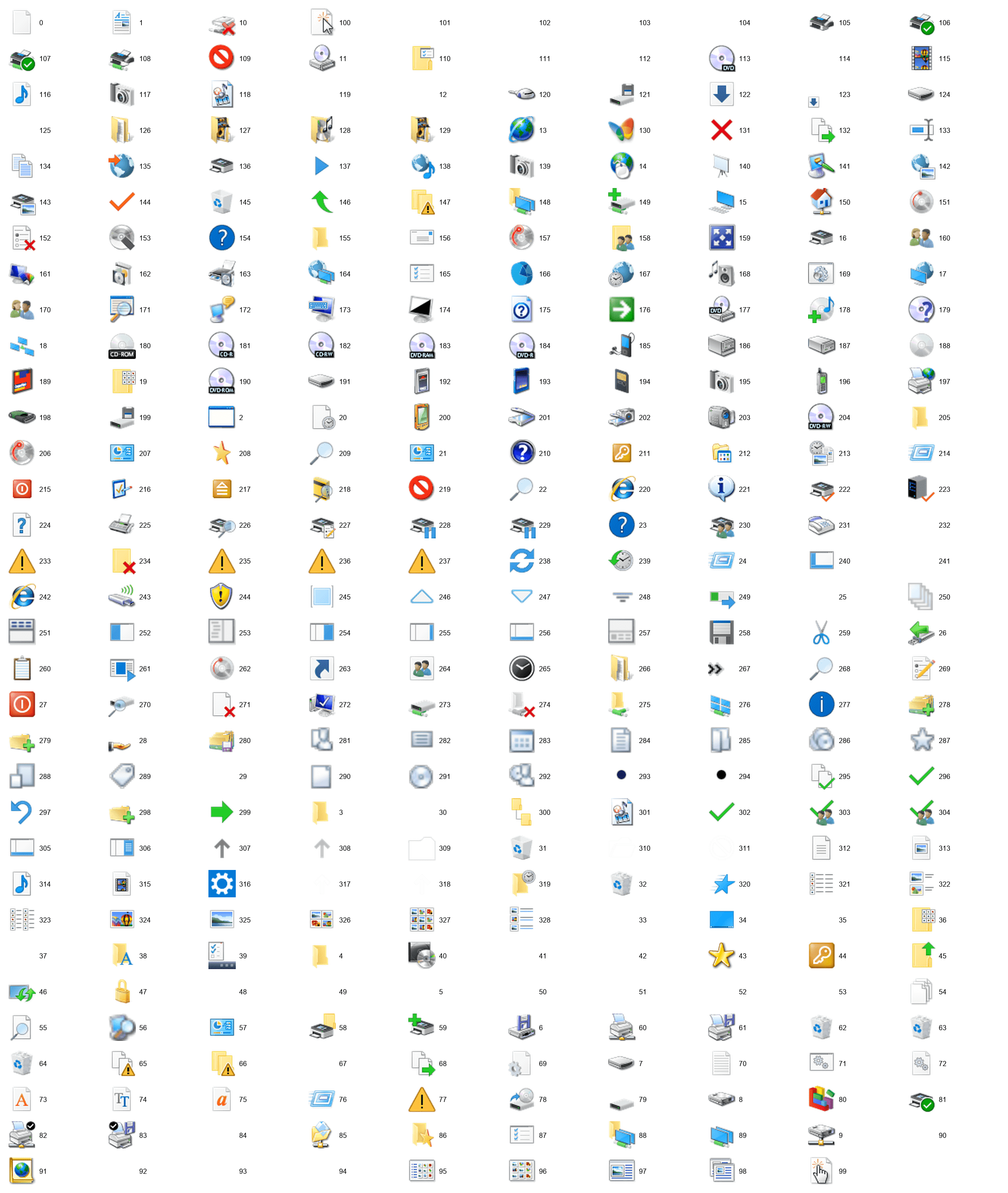
提取图标

import os
import ctypes
from ctypes import wintypes
import win32gui
from PIL import Image


def hbitmap_to_pillow(hbitmap):
"""
将 HBITMAP 转换为 Pillow Image(兼容新版 pywin32)
"""
# 确保 hbitmap 是 int 类型
hbitmap = int(hbitmap)

# 定义 BITMAP 结构
class BITMAP(ctypes.Structure):
_fields_ = [
("bmType", wintypes.LONG),
("bmWidth", wintypes.LONG),
("bmHeight", wintypes.LONG),
("bmWidthBytes", wintypes.LONG),
("bmPlanes", wintypes.WORD),
("bmBitsPixel", wintypes.WORD),
("bmBits", ctypes.c_void_p),
]

bmp = BITMAP()
ctypes.windll.gdi32.GetObjectW(hbitmap, ctypes.sizeof(bmp), ctypes.byref(bmp))

width, height = bmp.bmWidth, bmp.bmHeight
if width == 0 or height == 0:
raise ValueError("位图尺寸无效")

# 获取像素数据
total_bytes = width * height * 4
buffer = ctypes.create_string_buffer(total_bytes)
res = ctypes.windll.gdi32.GetBitmapBits(hbitmap, total_bytes, buffer)
if res == 0:
raise ctypes.WinError()

img = Image.frombuffer("RGBA", (width, height), buffer, "raw", "BGRA", 0, 1)
return img


def save_icon(hicon, filename):
"""
将 HICON 保存为 .ico 文件
"""
try:
icon_info = win32gui.GetIconInfo(hicon)
hbmColor = icon_info[4]

if not hbmColor:
raise ValueError("未获取到有效的 HBITMAP 颜色句柄")

img = hbitmap_to_pillow(hbmColor)
img.save(filename, format="ICO")

except Exception as e:
print(f"[!] 保存图标失败: {filename} - {e}")


def extract_icons(dll_path, output_dir):
"""
从 DLL 或 EXE 文件中提取所有图标
"""
if not os.path.exists(output_dir):
os.makedirs(output_dir)

total_icons = win32gui.ExtractIconEx(dll_path, -1)
print(f"[+] 检测到 {total_icons} 个图标")

for i in range(total_icons):
large, small = win32gui.ExtractIconEx(dll_path, i)
if large:
filename = os.path.join(output_dir, f"icon_{i}.ico")
save_icon(large[0], filename)
win32gui.DestroyIcon(large[0])
print(f"[+] 已保存: {filename}")
if small:
win32gui.DestroyIcon(small[0])

print("[✓] 图标提取完成!")


if __name__ == "__main__":
dll_path = r"C:\Windows\System32\shell32.dll"
output_dir = r".\extracted_icons"

extract_icons(dll_path, output_dir)

合并图标为一张图片

import os
from PIL import Image, ImageDraw, ImageFont


def generate_icon_preview(
input_dir, output_path, icons_per_row=10, icon_size=64, padding=20, font_size=16
):
"""
将目录中的所有 .ico 文件按行排列,并在右侧显示文件名,输出为一张 PNG 图片
"""
# 获取所有 ico 文件并按名称排序
files = sorted([f for f in os.listdir(input_dir) if f.lower().endswith(".ico")])
if not files:
print("[!] 未找到任何 .ico 文件")
return

# 尝试加载系统字体
try:
font = ImageFont.truetype("arial.ttf", font_size)
except:
font = ImageFont.load_default()

# 计算布局尺寸
rows = (len(files) + icons_per_row - 1) // icons_per_row
text_width = 150 # 右侧文字区宽度
cell_width = icon_size + text_width + padding
cell_height = icon_size + padding
img_width = icons_per_row * cell_width + padding
img_height = rows * cell_height + padding

# 创建空白背景
preview = Image.new("RGBA", (img_width, img_height), (255, 255, 255, 255))
draw = ImageDraw.Draw(preview)

for idx, filename in enumerate(files):
row = idx // icons_per_row
col = idx % icons_per_row

x = padding + col * cell_width
y = padding + row * cell_height

try:
icon_path = os.path.join(input_dir, filename)
icon_name = os.path.splitext(filename)[0]
icon = Image.open(icon_path).convert("RGBA")

# 统一缩放尺寸
icon = icon.resize((icon_size, icon_size), Image.LANCZOS)

# 绘制图标
preview.paste(icon, (x, y), icon)

# 绘制文字(文件名)
text_x = x + icon_size + 8
text_y = y + (icon_size - font_size) // 2
draw.text((text_x, text_y), icon_name, fill=(0, 0, 0), font=font)
except Exception as e:
print(f"[!] 无法加载 {filename}: {e}")

preview.save(output_path, "PNG")
print(f"[✓] 已生成图标预览图: {output_path}")


if __name__ == "__main__":
input_dir = r".\extracted_icons"
output_path = r".\icons_preview.png"

generate_icon_preview(input_dir, output_path)